My Journey to Building and Launching My First Website
With a Login & Signup System Using PHP and XAMPP
Getting Started: The Dream of Building a Website
When I first started learning web development, the idea of creating a fully functional website seemed challenging.
But step by step, I learned how to design, develop, and launch my first website with a Login & Signup system
using PHP and XAMPP on localhost. It was a dream come true! My next vision is to master phyton, while consistently
polishing and improving my fullstack web development skills. I am excited to see where this journey takes me.
The Learning Process
- Setting Up XAMPP: Installed XAMPP to run PHP and MySQL locally.
- Frontend Development: Used HTML, CSS, and Bootstrap to create a user-friendly design.
- Backend Development: Used PHP to process user registration and login.
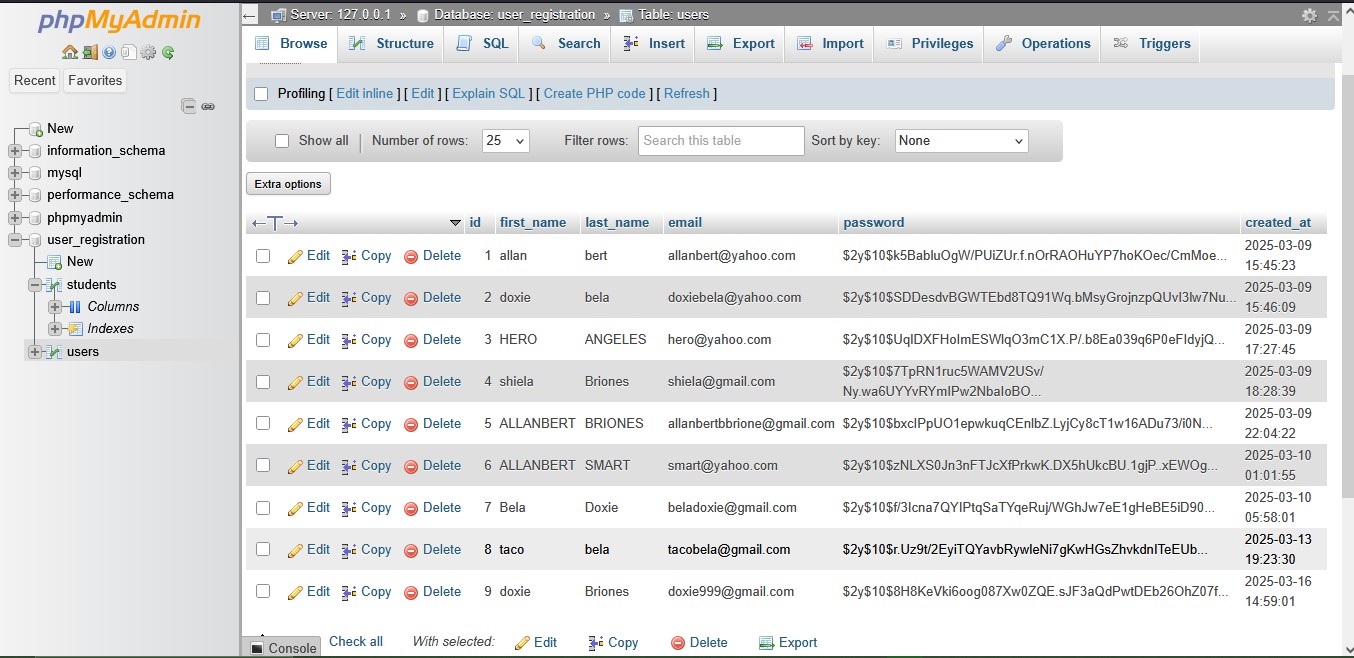
- Database Setup: Created a MySQL database with a users table to store user details securely.
- Testing & Debugging: Ensured smooth functionality and fixed any errors encountered.
Key Takeaways from This Journey
Building this project taught me several valuable lessons:
- Patience is key: Every challenge taught me something new.
- Security matters: Hashing passwords and preventing SQL injection is crucial.
- Practice makes perfect: The more I coded, the more confident I became.
What’s Next?
Now that my first full-stack website is running on localhost, my next goals include:
- Deploying the project online
- Enhancing the UI with JavaScript and AJAX
- Adding features like password reset and profile management
- Mastering professional top tier level javascript and database management
- Learning advanced PHP and MySQL concepts for continues innovation
- Mastering backend fundamentals and Step up to learning basic to advance phyton
- Clean and refactor the code for better maintainability